

1.Overview
This guide will explain all the customizing needed in order to use and maintain the PO Collab.
The customize options allows the users to:
- Configure environment data:
- Process configuration
- Email look & Feel
- Customize Purchase Order Attribute
2.PO Collab Customizing (IMG)
- Login to SAP
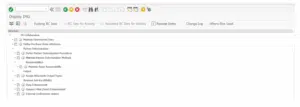
- Go to the Insight Zap transaction in ‘/DPS/PO_CLB_IMG’ (T-code). You might want to save this transaction in your favorites.
The following window will open:
2.1.Maintain Environment Data
In the PO Collab’s IMG select “Maintain Environment Data” or enter transaction /DPS/PO_CLB_PAR_VAL.
The following window will open:

Fill in the next fields:
| Field | Options |
| PartnDet.Proc. | Set Partner Determination Procedure (From the MM-Pur Customizing) |
| Conf. Control | Default Conf. Control (if not found in vendor) |
| Confirm. Cat. | Select relevant Category. |
| Sender Email | Defines which email address will send the output.
01 System Default 02 Buyer Email |
| Split Position | Position of the ‘Split’ key in the line.
F First L Last |
| Text Name | Email body text.
*Maintained in Transaction SO10 |
| PO Text | Enables to customize a special Purchase Order Text that will be added to the sent email |
| Signature | The signature at the bottom of the email text |
| Graphic Name | Option to add the company’s logo to the email |
| Output Type | The Purchase Order output type to be attached to the email |
| Confirmation Mail To Vendor | PO Collab can send a confirmation email according to the following options:
|
| Reminder Days | Days to pass with no vendor feedback until a reminder email will be sent to the vendor |
| Reminder 1 Days | Days to pass without feedback from previous reminder email until another reminder email will be sent to the vendor |
| Text Name | The reminder’s email body text |
| Disable | When you set this flag, all active reminders won’t be sent (even if the deadline of reminder has been reached). |
| Reduce Qty. | Customize id reducing quantity of PO items is allowed in the PO Collab Monitor |
| Increase Qty. | Customize id increasing quantity of PO items is allowed in the PO Collab Monitor |
| Monitor Upd. | An Option to allow updates at the PO Collab Monitor Transaction at entire PO vs. selected PO lines |
| Log Active | Check to log all activities in the PO Collab |
2.2.Define Purchase Order Attributes
In the PO Collab’s IMG select “Define Purchase Order Attributes” or enter transaction /DPS/PO_CLB_PAR.
Attributes can be maintained at each of the following combinations:
- Order Type
- Purchase Organization
- Purchase Group
The current window will open:

| Field | Options |
| Set Default | When this flag is set, PO Collab indicator is checked by default (In case PO Collabo is active for the vendor). PO Collab indicator can still be updated manually in PO. |
| Copy To Buyer | Sends an email copy to the buyer when the email is sent to the vendor. |
| Update Buyer | Sends an email when the vendor confirms and does not have any updates. |
| Buyer Reminder Indicator | Enable/Disable the reminders to the buyer |
| Conf. Update | Update Confirmations tab in the order |
| Ackn. Update | Update ‘Order acknowledgment’ field in Confirmations tab with date and time. |
| Schedule Update | Update delivery date in ‘Statistical Relevant Delivery Date’ field in Delivery schedule tab. |
| Stat. Del Upd. | Check to determine whether Statistics-Relevant Delivery Date value should be updated or not. In case the checkbox isn’t set, Statistics-Relevant Delivery Date (EKET-SLFDT) should not be changed/copied from the source schedule line (in case of split). |
| External Update | Allow external confirmation processing during confirmation update (either automatic from confirmation mail or manual via PO Collab monitor). It will allow, for example, creation of inbound delivery instead of/in addition to standard update of PO schedule lines/confirmations. |
| ParntDet.Proc. | Option to select the Partner Determination Procedure |
| Output Type | Specifies the kind of output type to be produced. |
| Graphic name | Graphic image name |
2.3.Partner Determination
In this section you can define the PO Collab Partner behavior.
First you can define a procedure which sets the Partner types relevant for the PO Collab and then if needed program a special BAdi to set your company logic.
2.3.1.Define Partner Determination Procedures
In the PO Collab’s IMG select “Define Partner Determination Procedures” or enter transaction /DPS/PO_CLB_PAR_PROC.
2.3.2.Maintain Partner Determination Methods
In the PO Collab’s IMG select “Define Partner Determination Procedures” or enter transaction /DPS/PO_CLB_PAR_METH.
The following window will open:

All available Determination methods that were defined are listed.
For each Determination method a BAdi implementation can be defined with the logic of email address.
When a BAdi is implemented a Green light will appear
For example, the VU BAdi in the above screenshot has the logic to select the vendor and go to the vendor master data table (KNA1) and select the email field.
2.4.Output
In this section you can customize the Purchase Order document types that will be attached to emails sent from the PO Collab.
2.4.1.Assign Attachable Output Types
Set the Purchase order output type.

3.Customizing a Vendor
PO Collabo uses the Vendor’s master data to determine the communication email.
Therefore You have to make sure that there is an email in each of the vendors’ master data.
Enter vendor in transaction MK02.
Maintain the relevant email address to all relevant PO Collab Vendors.

Important Note:
- Email addresses that are marked with a check box “do not use for communication” will be excluded from the automation email process.
4.Sending Work Items
Sending work items in PO Collab, process to an external email will be done via a program /DPS/PO_CLB_SEND which is included on a scheduled job.
In order to activate the program manually perform the next steps:
Enter transaction /DPS/PO_CLB_SEND.
The current window will open:

Choose relevant variants.
Click on the Execute Button 
Important Note:
- You might have to wait a few minutes in order to let the Send Message workflow process finish.
5.Copyright
© Copyright 2015 Dpro Ltd. All rights reserved.
No part of this publication may be reproduced or transmitted in any form or for any purpose without
the express permission of Dpro Ltd. The information contained herein may be changed without prior
notice.
