

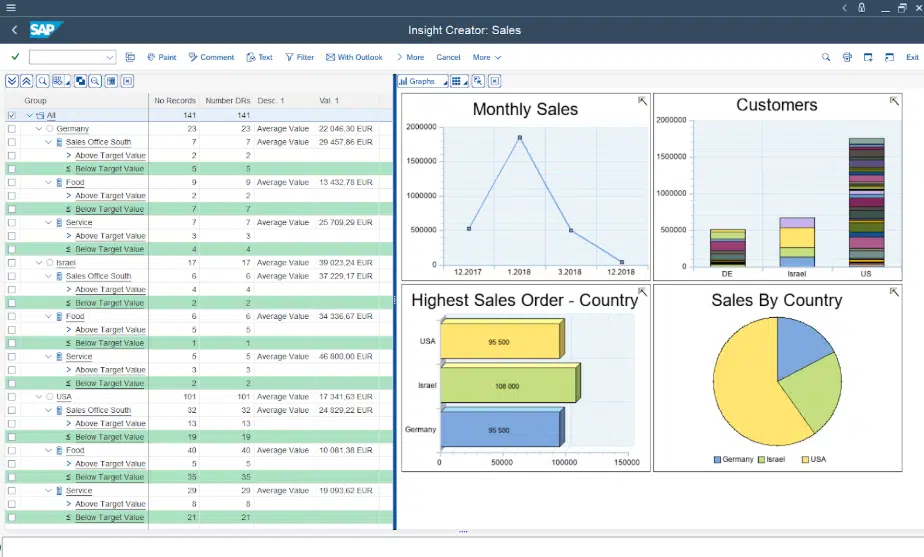
Insight Zap is a no-code solution that runs within SAP. Users can create and edit reports, business processes, Fiori assets, and more on SAP and always get real-time results. SAP Analysis for Office is a BI tool that extracts data from SAP and generates reports in Office.
In one sentence – Insight Zap is an operational platform, while Analysis for Office is a BI tool.
In the past, we published an article about the differences between BI and Insight Zap. What we argued before and still believe in today is that since Insight Zap is an operational tool within SAP, its main benefit is its ability to present users with real-time data. You can create various reports, graphs, and dashboards with Insight Zap, but its uniqueness is that it’s the only tool that resides within SAP, getting accurate data while minimizing security risks.
Analysis for Office, in contrast, is a BI tool that does what many other BI tools do, extracting data from SAP and processing it on an external platform. For the sake of our argument, it doesn’t matter if we are speaking of SAP Analysis for Office, Tableau, Clear Analytics or other tools.
Users of BI platforms might prefer one software over the other, but they are all doing the same thing, Analysis.


Why Use SAP Analysis for Office (AO)?
SAP Analysis for Office is a BI tool that allows users to download data from SAP to Excel and PowerPoint. Users define SAP assets as data sources and download them to Excel, where they process the data.

Moreover, SAP Analysis for Office has ready-made reports for analysts to use or modify. All the features people know from Excel, such as pivot tables, conditional formatting, formulas, graphs, etc., are available to them. In addition, SAP Analytics for Office is actionable. Users can move from an overview of data to a more detailed view using the same dataset.
Extracting the data from SAP to AO is done in one of the following ways. First, by accessing BW systems. Second, some data sources can be accessed directly from Excel. Third, by using API functions to filter data in the Visual Basic Editor. Lastly, you can connect SAP data to Excel by coding. Downloading specific columns/fields out of a bigger SAP report is likely to require coding.
Regarding security, when the software is first connected to SAP, the latter checks the user’s authorization level and ensures they have the needed credentials. However, once the data is downloaded, the user can send reports to others, as in other Excel files. Meaning that people would get the reports regardless of their SAP authorization level.
The key benefit of AO over other BI tools is that most analysts are familiar with Excel. Thus, users can feel comfortable working with AO instead of learning to work with a new BI tool such as Tableau.
The Benefits of Insight Zap:
Insight Zap is an operational tool, not a BI tool; we cannot stress that enough.
Insight Zap works as a layer within SAP. You can create and edit Z reports, turn SAP standard reports into Z reports, use grouping, conditional formatting, automation, collaboration, and more. The beauty is that it’s always in production, showing real-time data. The data is actionable; you can navigate from an overview view to specific items.
You can export SAP data in Excel and almost any other format without code, APIs, or external systems. If you can access a certain SAP report, standard or Z, you can also download it. You can also select parts of any report and download them without code.
Insight Zap also offers solutions regarding SAP IDoc and log viewer.
No other tool in the market allows you to do so much within SAP, in minutes, without writing a single line of code.
In terms of security, Insight Zap has different levels of authorization. To use it, the user must have the necessary SAP authorization and Insight Zap. If people download data from SAP to Excel (you can import and export data in various formats), they can share it with their colleagues. However, discreet data can be marked as one, making sharing it outside SAP impossible. Since BI tools usually export data from SAP to their platforms, they cannot offer such a high level of security.
In Summary:
SAP Analysis is a BI tool, while Insight Zap is an operational tool. They are completely different and serve other purposes. From our point of view,Insight Zap and BI tools are not competing since they exist in separate realms. SAP Analysis for Office is just one of many analytical tools, while Insight Zap is a one-of-its-kind operational tool.
